
An app to search inside your saved videos
2 min readUpdated
Quick answer
A title rarely says what the video teaches. Munvi writes down what is said in every video you save — from Instagram, TikTok or YouTube — and search finds the video by any word spoken in it, showing the line and the minute.
Thin and Chewy Rippled Chocolate Chip Cookies
@davespizzaoven · Instagram
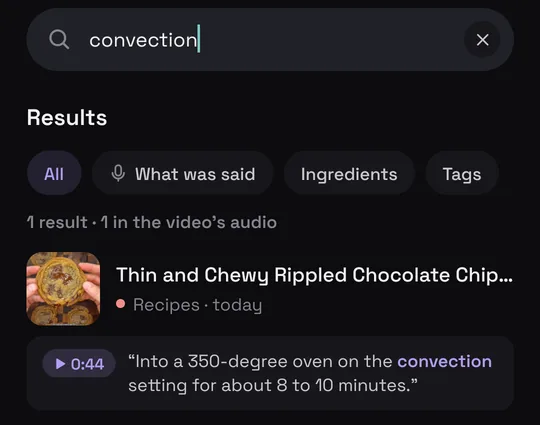
Said at 0:44“Into a 350-degree oven on the convection setting for about 8 to 10 minutes.”
Who it’s for: Anyone who remembers the tip but not the video it was in.
In this guide
How it works
- 1
Share the video
On Instagram, TikTok or YouTube, tap Share and pick Munvi.
- 2
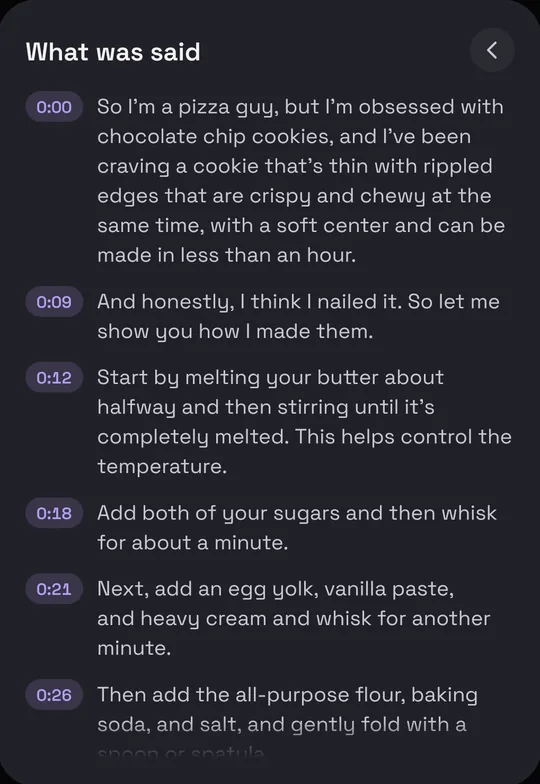
Munvi writes down what was said
Along with the title and summary, the card keeps what was said, with the minute of each line.
- 3
Search for what you remember
Type a word or a phrase: the result shows the line where it was said. Or ask Mun: “which video talked about the convection setting?”

Or ask your collection
Mun answers from what you saved and says which post it came from. On Munvi Pro, you can also connect Munvi to Claude or ChatGPT and ask there.
Questions
Does every video get a transcript?
Only the ones with speech. A video with just music or on-screen text gets a title and summary, but has no speech to write down.
Does search only look at what was said?
No: it also looks at the title, the summary, the ingredients and the tags.
And without Munvi?
On YouTube, Show transcript, in the video’s description, searches inside one video at a time. To find which video, search Google for the line in quotes.
Sources
Menus change with app updates. Seeing something different on your screen? Write to oi@munvi.app and we’ll fix the guide. How we write the guides