
An app to save Reels and TikToks
2 min readUpdated
Quick answer
Saving on Instagram or TikTok keeps a shortcut to the video. Munvi keeps what it teaches: share the Reel or the TikTok and it becomes a card with a title, a summary and what was said — the recipe, the workout, the place — in a folder by subject. Your old Instagram saves and TikTok Favorites come in all at once.
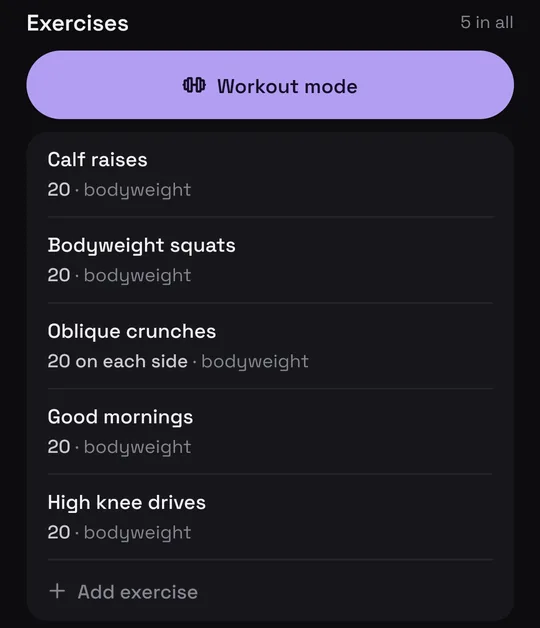
Joint-Friendly Standing Full Body Workout
@b.palmer_ · Instagram
Said at 0:15“you would have just completed a full-body workout all standing, light on your joints, perfect for mobility, burning a whole lot of calories.”
Who it’s for: Anyone who saves Reels and TikToks for later and, when they need one, can’t find it or can’t remember what it was about.
In this guide
How it works
- 1
Share the post
On the Reel or the TikTok, tap Share and pick Munvi. You stay in the app, and a notification comes when the card is ready.
- 2
Munvi writes it down and sorts it
It watches the video and writes the card: a recipe with ingredients, a workout with sets, a place on the map or the main points. The card lands in the right folder.
- 3
Bring what you already saved
Export your Instagram saves and pick the file in Munvi, without unzipping it: everything comes in at once, and your collections become folders.

One place for the rest, too
YouTube videos, X posts, Pinterest pins, websites and Google Maps places come in the same way: by sharing them to Munvi.
Questions
Do I have to share my old saves one by one?
No. Instagram saves come in all at once through the export, and TikTok Favorites through TikTok’s data file (Settings › Import from TikTok).
If the post is deleted, do I lose it?
The card stays with you: the title, the summary and what was said remain in Munvi.
Do I need to give Munvi my Instagram password?
No. Munvi never signs in to your account: you share posts and, for the old ones, pick the file Instagram sends you.
Sources
- Instagram Help Center: download a copy of your information
- Instagram Help Center: save posts
- TikTok Help Center: Favorites
Menus change with app updates. Seeing something different on your screen? Write to oi@munvi.app and we’ll fix the guide. How we write the guides