
An app to organize your saved recipes
2 min readUpdated
Quick answer
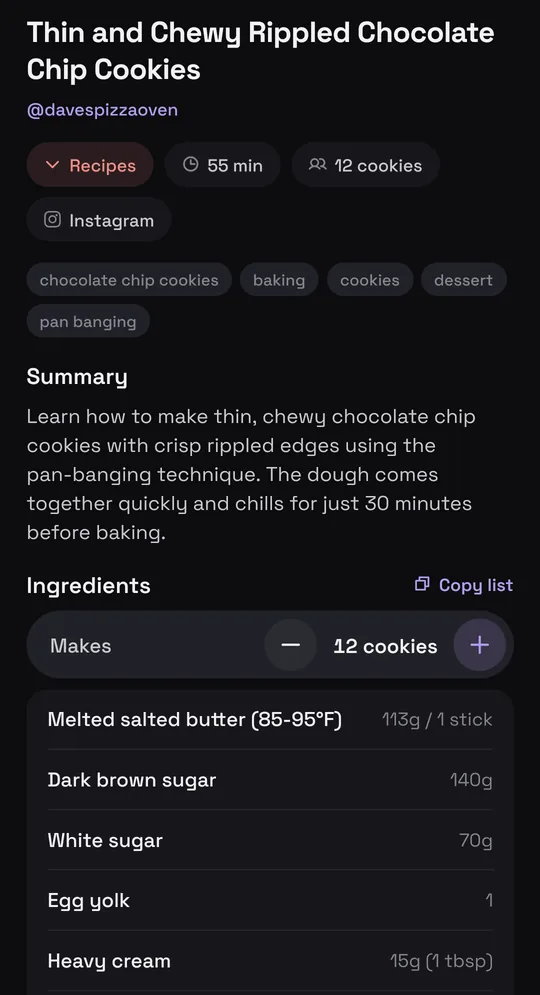
Munvi reads the recipe from the reel, the TikTok, the YouTube video or the website and writes a card: ingredients with amounts, method and times, even when the recipe was only spoken in the video. Each card lands in your Recipes folder, and search finds it by an ingredient or by something said in the video.
Thin and Chewy Rippled Chocolate Chip Cookies
@davespizzaoven · Instagram
Said at 0:44“Into a 350-degree oven on the convection setting for about 8 to 10 minutes.”
Who it’s for: Anyone who saves recipes in several apps and, when it’s time to cook, can’t find them — or finds them and has to pause the video at every step.
In this guide
How it works
- 1
Share the recipe
On Instagram, TikTok, YouTube or in your browser, tap Share and pick Munvi.
- 2
Munvi writes the card
Ingredients with amounts, steps with times and the post’s link, in your Recipes folder. A notification tells you when it’s ready.
- 3
Find it and cook
Search by an ingredient or by something that was said. In the kitchen, cook mode shows one step at a time, with a timer.

With what you already saved, too
Your old Instagram saves and TikTok Favorites come in all at once through the export, without sharing them one by one, and any recipe becomes a full card with one tap. Several recipes become one shopping list, adding up what repeats.
Questions
Does it work with recipe websites?
It does: a recipe page also becomes a card with ingredients and steps.
What if the recipe was only spoken in the video?
Munvi watches the video and writes down what was said and what was written on screen.
Can I change the servings?
Yes: servings change with one tap, and the amounts follow.
Sources
Menus change with app updates. Seeing something different on your screen? Write to oi@munvi.app and we’ll fix the guide. How we write the guides